AI at work
How to use AI day to day so it really saves time: productivity, delegating tasks and the risks of rolling it out in a company.
4 papers · 40 takeaways · AI Safety · Prompting
Key takeaway #1
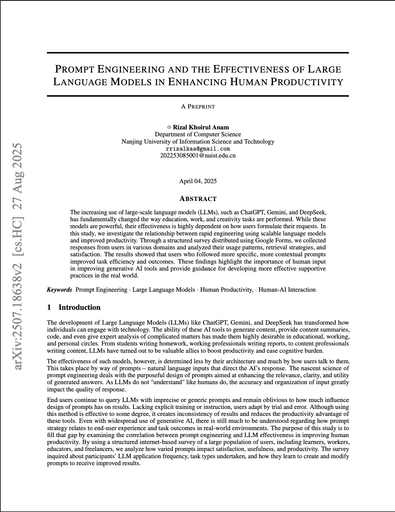
Is your prompt a single sentence? Break it into sections.
Task, context, instructions. According to the research, this layout directly raises your productivity and the relevance of answers. See how to use it.
From the paper: Prompt Engineering and the Effectiveness of Large Language Models in Enhancing Human Productivity · Rizal Khoirul Anam · 2025
Key takeaway #2
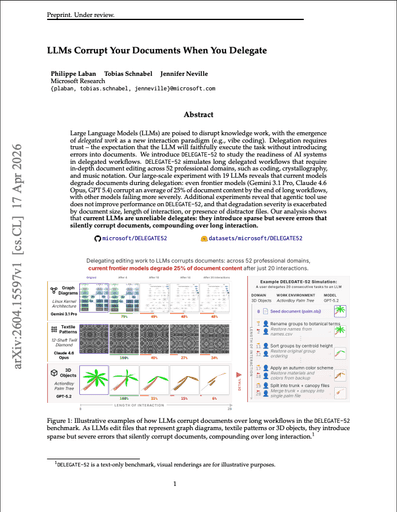
One task went fine. The trouble shows up after many more.
When each step builds on the last, AI gradually loses and distorts information. See how the authors caught it and what you should check in your own files.
From the paper: LLMs Corrupt Your Documents When You Delegate · Philippe Laban, Tobias Schnabel, Jennifer Neville · 2026
Key takeaway #3
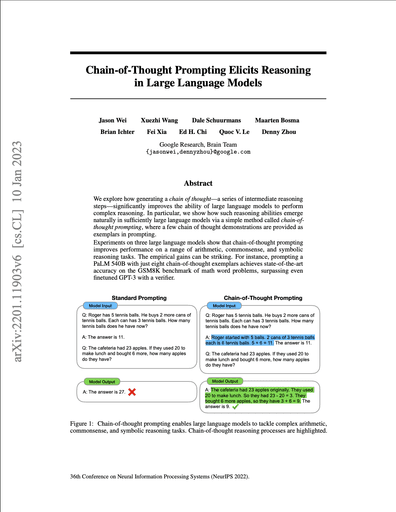
There's a way to stop AI making mistakes in simple math. And it isn't retraining the model.
It's one example in your prompt that shows the reasoning. Once the model sees how you reach an answer, it does the same.
From the paper: Chain-of-Thought Prompting Elicits Reasoning in Large Language Models · Jason Wei et al. · 2022
Key takeaway #4
Tested before launch? That still doesn't make it safe.
AI capabilities keep evolving, so a single pre-launch test isn't enough. See how to keep watching a system once it's running in your organization.
From the paper: International AI Safety Report 2026 · Yoshua Bengio et al. · 2026